A practical guide to finding what is stopping profile views from turning into phone enquiries.
Your Google Business Profile is getting views, but the phone is quiet. That is frustrating. A view means someone saw your profile; it does not mean they were ready to call, found the information they needed, or felt confident choosing your business.
The useful question is not just how many people viewed your profile. It is where potential customers drop off. Here are the common causes and what to check first.
What does a Google Business Profile view mean?
Google reports views of your profile on Search and Maps, along with actions such as calls, website clicks, and direction requests. The calls metric counts clicks on the call button. It does not confirm that a call connected or became a booking.
That distinction matters. Someone may view your hours, compare you with other businesses, or visit your website without calling. Check your profile data alongside your own call log to understand what happened.
Why your profile may get views but few calls
People are finding you through the wrong searches
Check the search terms in your Business Profile performance report. If they do not match the services you offer, some of your views may come from people who are not looking for your business.
For example, a business that repairs home air conditioners might appear for broad searches such as “air conditioning” or for searches about products it does not sell. Those views are less likely to turn into calls.
Make sure your profile clearly explains your services, category, service area, and opening hours. Google says local results are based mainly on relevance, distance, and prominence. Complete, accurate information can help Google match your profile with relevant searches.
Important information is missing
People often scan a profile quickly before deciding whether to call. If key details are missing or difficult to find, they may choose another business.
Check that your profile includes:
- The correct phone number
- Accurate opening hours, including weekends and holidays
- A clear business description
- Relevant services or products
- The correct address or service area
- Recent, genuine photos
- A working website link
Small errors can cost you enquiries. If your hours say you are closed when you are open, a potential customer may not bother calling.
Your reviews are not building confidence
Reviews help people decide whether a business is the right choice. A low rating, few recent reviews, or unanswered complaints may make someone hesitate.
You cannot control what customers write, but you can respond calmly and specifically. Ask satisfied customers for honest feedback after a genuine interaction. Do not offer incentives for reviews or pressure customers to leave positive ones.
Google recommends responding to reviews to show that you value customer feedback.
It is not clear why someone should choose you
If your profile looks much like every other option, people may keep comparing instead of calling. Explain what you actually offer and who you help.
Useful details may include:
- The services you provide most often
- The areas you cover
- Whether customers need an appointment
- What to expect on a first visit
- Photos of your team, location, or completed work
Keep it factual. Do not make claims you cannot support.
The phone number or call handling is letting you down
Sometimes the issue is with the calls, not the profile. Call the number shown on your profile from another phone. Make sure it works, someone is available during the listed hours, and the voicemail tells callers what to do next.
If calls are being missed, improve call coverage and return messages promptly. Make sure your team can answer common questions about availability, price range, location, and next steps. If a customer has to call twice to get basic information, they may move on.
Your website is getting the visit instead
Some people will tap your website link rather than call directly. If your site is slow, difficult to use on a phone, or hides your contact details, that visit may not become an enquiry.
Open your website on a phone using the link on your profile and check:
- Is the phone number easy to find?
- Does the call button work?
- Are your services clear?
- Is the contact form short and easy to use?
- Does the website match what your profile promises?
Make the next step obvious. A visitor should not have to hunt for a way to contact you.
Use your profile data to find the drop-off
Open your Business Profile and go to the Performance section. Choose a useful date range and compare views, website clicks, direction requests, and calls. Remember, the calls metric counts call button clicks, not confirmed conversations.
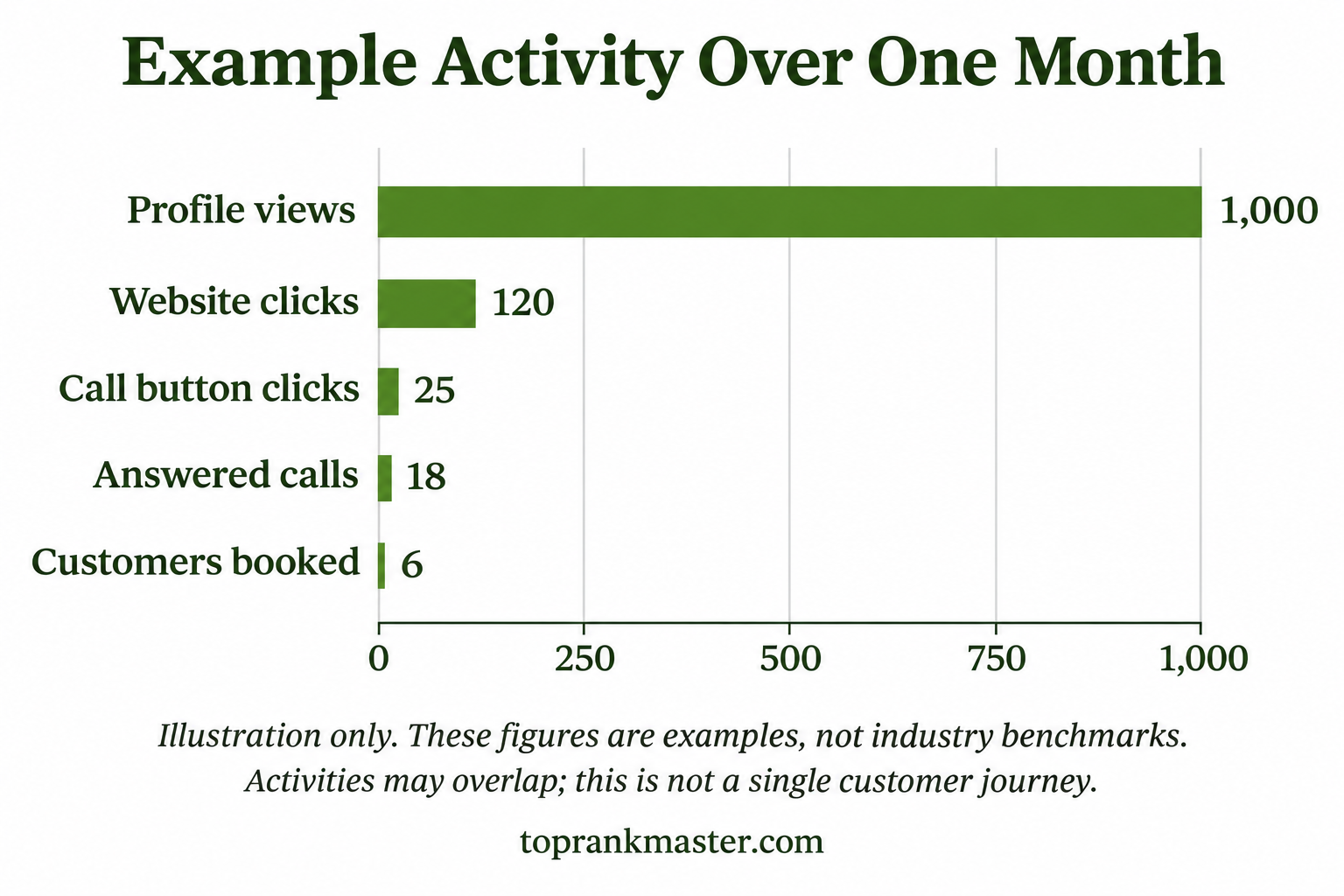
Illustration only. These figures are examples, not industry benchmarks.
There is no single number that guarantees success. Look for where activity drops off:
- Many views but few clicks: Check whether your services, location, reviews, and photos make the right impression.
- Many call clicks but few answered calls: Test your number and improve call coverage.
- Calls but few bookings: Listen for common questions or objections and make the next step clearer.
- Website clicks but few enquiries: Improve the mobile experience and make contact details easier to find.
Keep a simple log of calls, missed calls, and bookings, or use a customer management tool. Your profile shows interactions; your own records help you see which ones became real leads.
What should you improve first?
Start with the basics:
- Correct your phone number and opening hours.
- Check that your category and services are accurate.
- Add recent photos that reflect your real business.
- Respond to reviews, including critical ones.
- Test your website and contact buttons on a mobile phone.
- Record calls, missed calls, and bookings for a month.
Then compare the next period with the previous one. Make a few changes at a time and keep notes, so you can see what appears to help.
Turn profile views into a clearer action plan
More views are useful when the right people can understand what you offer and contact you easily. Check your search terms, profile details, reviews, phone handling, and mobile website. Then track calls through to bookings.
That will tell you more than views alone.
Why am I getting views on my Google Business Profile but no calls?
A view means someone viewed your profile. They may not be ready to buy, may be comparing businesses, or may not have enough information to feel confident calling. Check your search terms, opening hours, services, reviews, phone number, and website.
Does a Google Business Profile view mean someone visited my business?
No. A view means someone viewed your profile on Google Search or Maps. It does not mean they called, visited your website, requested directions, or came to your business.
Does the calls number mean someone actually spoke to my business?
Not necessarily. Google counts clicks on the call button. Compare that number with your call log to see whether calls connected and led to enquiries or bookings.
How can I get more calls from Google Maps?
Keep your profile complete and accurate, including your category, phone number, opening hours, services, and location. Add helpful photos and ask customers for honest reviews. Google says local results are based mainly on relevance, distance, and prominence. No one can pay Google for a better local ranking.
Should I add keywords to my business name?
Use your real-world business name. Focus on accurate profile information and clear service details rather than adding keywords to the name.
A view means someone viewed your profile. They may not be ready to buy, may be comparing businesses, or may not have enough information to feel confident calling. Check your search terms, opening hours, services, reviews, phone number, and website.
No. A view means someone viewed your profile on Google Search or Maps. It does not mean they called, visited your website, requested directions, or came to your business.
Not necessarily. Google counts clicks on the call button. Compare that number with your call log to see whether calls connected and led to enquiries or bookings.
Keep your profile complete and accurate, including your category, phone number, opening hours, services, and location. Add helpful photos and ask customers for honest reviews. Google says local results are based mainly on relevance, distance, and prominence. No one can pay Google for a better local ranking.
Use your real-world business name. Focus on accurate profile information and clear service details rather than adding keywords to the name. Our local SEO services include Google Business Profile optimization and business information updates.
For a practical example of location-based optimization, explore our multi-location local SEO case study.

I am Harjinder Singh, Founder & Coach at Top Rank Master with 11+ years of digital marketing experience. I have worked with leading agencies and helped scale multiple brands through SEO, PPC, and performance marketing.
I run Top Rank Master, where I train students and professionals through practical, industry-focused coaching with 100% placement support. I am passionate about helping college students start strong careers and guiding agencies to achieve measurable growth.
Let’s connect if you want to learn digital marketing or grow your business.